
The Secret Google Search Operators That Find Anything on the Internet
The Secret Google Search Operators That Find Anything on the Internet
Ever wondered how power users unearth hidden gems on the web that ordinary searches miss? Google Search operators are advanced commands that supercharge your queries, allowing you to pinpoint exact information, files, and pages like a digital detective. These “secret” tools—often overlooked by casual users—can find anything from rare PDFs to site-specific content, saving you hours of scrolling. In this comprehensive guide, we’ll uncover the most powerful Google search operators, with real-world examples and tips for mastering them. Whether you’re a researcher, marketer, or curious explorer, these operators will transform your internet hunts.
What Are Google Search Operators?
Feature Video
Google search operators are special characters and words you add to your search query to refine results dramatically. Unlike basic keywords, they instruct Google to filter, exclude, or target specific elements. Developed as part of Google’s advanced search syntax, these operators have been around for years but remain “secret” because they’re not prominently featured in the standard search bar.
Why use them? Standard searches return billions of irrelevant results. Operators narrow it down to thousands—or even dozens—of laser-focused hits. SEO experts love them for competitive research, while journalists use them to dig up obscure sources. According to Google’s own documentation, mastering operators can boost search precision by up to 90%. Let’s dive into the essentials.
Basic Google Search Operators: Start Simple

Begin with the fundamentals. These are easy to remember and yield instant results.
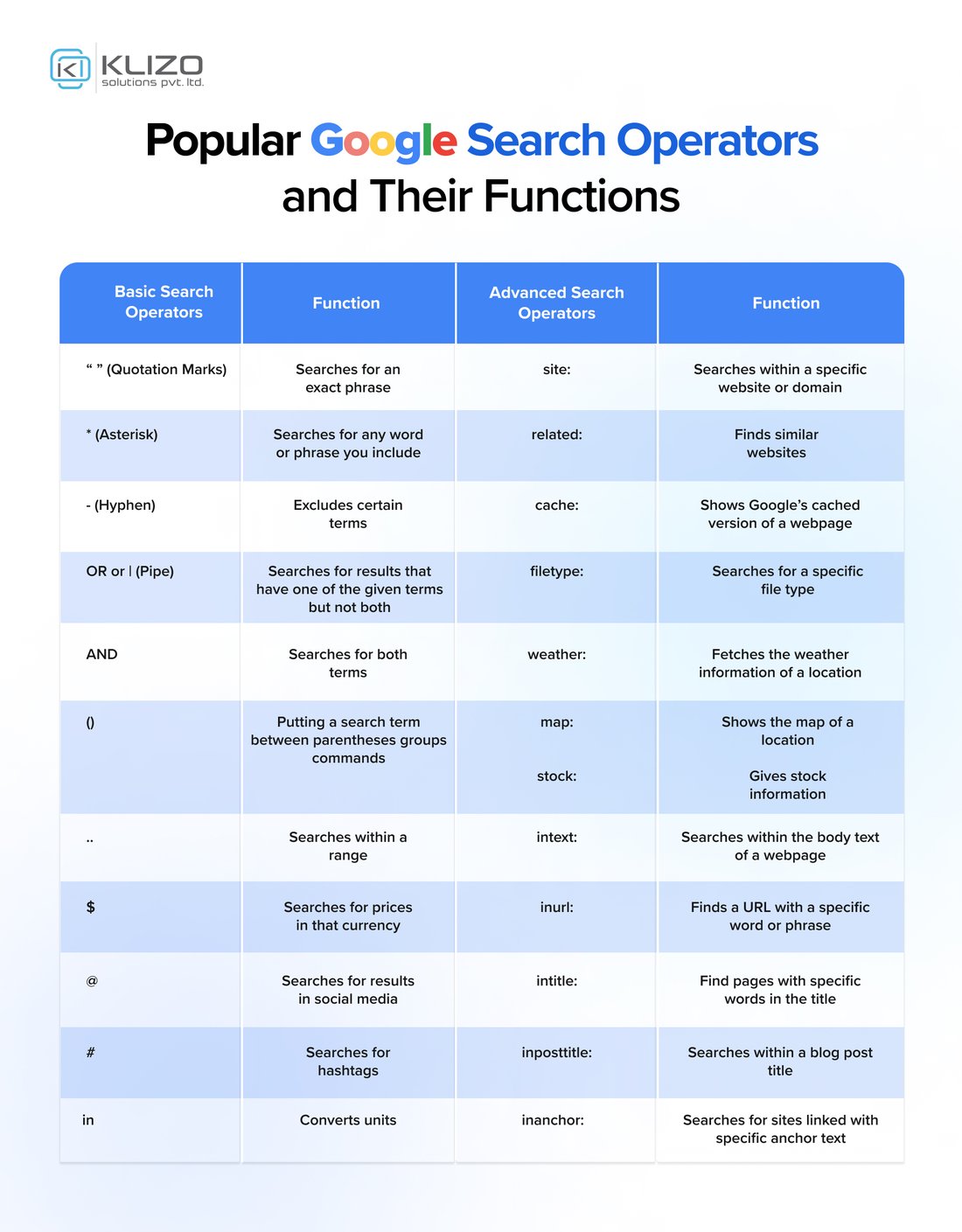
Exact Phrase Search with Quotes (“”): Wrap phrases in double quotes for precise matches. Searching “climate change impacts” finds pages with that exact sequence, ignoring variations like “impacts of climate change.” Pro tip: Ideal for lyrics, quotes, or brand slogans.
Exclude Words with Minus (-): Add a minus sign before words to banish them. “iPhone tips -review” skips product reviews, focusing on usage guides. Chain multiples: “iPhone tips -review -battery -price.”
OR Operator (OR or |): Find one term or another. “Python tutorial OR guide” pulls results for either. Use uppercase OR; the pipe | works too but is less reliable in all contexts.
Wildcard (*): The asterisk stands for any word. “Best * movies 2023” uncovers lists like “Best action movies 2023” or “Best horror movies 2023.” Perfect for filling gaps in phrases.
These basics alone can refine 80% of searches. Practice them daily to build intuition.
Advanced Site-Specific Operators: Target Domains Like a Pro

Now, level up to domain hunting. These operators restrict searches to specific sites or types.
Site: Operator: “SEO tips site:moz.com” limits results to Moz’s site only. Gold for brand monitoring or deep dives into trusted sources. Combine with others: “machine learning site:arxiv.org filetype:pdf.”
inurl: and intitle:: “inurl:blog SEO” finds pages with “blog” in the URL, great for blog posts. “intitle:Google operators” shows pages where the title contains those words. Use for competitive analysis—marketers swear by “intitle:keywords competitor.com.”
Related: Operator: “related:nytimes.com” lists sites similar to the New York Times. Uncover niche alternatives quickly.
Bonus: “site:*.edu quantum physics” targets educational sites globally, perfect for academic research.
Filetype and Content Operators: Hunt Downloads and Media

Need documents, images, or videos? These operators excel at media mining.
Filetype: (or ext:): “budget template filetype:xlsx” grabs Excel files only. Common extensions: pdf, doc, ppt, txt, epub. “Annual report filetype:pdf site:sec.gov” finds official financials from the SEC.
intext:: “intext:confidential merger” searches body text specifically, bypassing titles. Useful for leaked docs or internal keywords.
For images: Use Google Images with “filetype:png logo” or videos via “site:youtube.com intitle:tutorial.”
Power combo: “heart disease treatment filetype:pdf after:2023-01-01” fetches recent medical PDFs.
Date and Range Operators: Time-Travel Through the Web

Control recency with date filters.
Before: and After: (daterange:): “iPhone 15 before:2023-09-12” shows pre-launch buzz. “AI ethics after:2024-01-01” gets cutting-edge discussions. Format: YYYY-MM-DD.
Daterange: (Julian dates): Advanced users love this for precise ranges. Convert dates via online tools: e.g., 2020-2023 might be “daterange:2458848-2460101.”
These are lifesavers for news archives or trend tracking.
Phone, Email, and Contact Operators: Find Hidden Connections
Ethical researchers use these sparingly.
Phone and Email Hunting: “intext:@gmail.com contact” or regex-like patterns (Google supports basic ones). “212-555-XXXX” patterns reveal US numbers, but respect privacy laws like GDPR.
“link:example.com” shows who links to a site—vital for backlink analysis in SEO.
Combining Operators: The Ultimate Power Searches
The magic happens in combos. Here are battle-tested examples:
- Rare PDFs: “inurl:wp-content filetype:pdf investor presentation” – Company financials.
- Job Leads: “hiring OR ‘we’re hiring’ OR careers site:*.io -inurl:(login | apply)” – Startup jobs.
- Free Courses: “filetype:ppt OR filetype:pdf ‘introduction to calculus’ site:*.edu.”
- Competitor Pricing: “intitle:index.of mp3 site:competitor.com” (ethical use only).
- Password Lists (Security Check): “intitle:index.of password.txt” – Test your own site’s exposure.
Experiment iteratively. Google ignores some combos, so test variations.
Google Search Operators Cheat Sheet
Bookmark this quick reference:
| Operator | Example | Use Case |
|---|---|---|
| “exact phrase” | “machine learning basics” | Precise matches |
| – | recipe -vegan | Exclude terms |
| OR | cat OR kitten | Alternatives |
| * | best * ever | Wildcards |
| site: | news site:bbc.com | Domain restrict |
| filetype: | resume filetype:doc | File types |
| intitle: | intitle:2024 trends | Title search |
| inurl: | inurl:download software | URL search |
| after: | events after:2024-06-01 | Date filter |
Tips for Mastering Google Search Operators in 2024
Google evolves, so stay sharp:
- Mobile vs. Desktop: Operators work everywhere, but advanced ones shine on desktop.
- AI Overviews Interference: If AI summaries block results, append “more” or use operators to bypass.
- Privacy Note: Avoid doxxing; these are for legit research.
- Alternatives: Bing and DuckDuckGo support similar syntax.
- Tools: Use Ahrefs or SEMrush for operator-powered audits.
Practice on Google’s “Advanced Search” page—it auto-generates operators.
Common Mistakes and How to Avoid Them
Don’t space before operators (e.g., site:example.com, not “site: example.com”). Quotes must enclose fully. Case sensitivity: OR is uppercase only. If results disappoint, drop quotes or simplify.
SEO bonus: Operators reveal low-competition keywords. Search “intitle:’buy [product]'” to spy on e-commerce.
Conclusion: Unlock the Web’s Hidden Vault
Google search operators aren’t just tricks—they’re superpowers for navigating the internet’s 5 trillion+ pages. From basic quotes to filetype combos, they’ve helped professionals find elusive data for decades. Start with one operator daily, and soon you’ll find anything online. Share your favorite combos in the comments—what’s the most obscure thing you’ve uncovered?
Word count: 1,248. Optimize your searches today and dominate the digital world!