
How to Write a Resume That Beats the AI Screening Software
Introduction to Beating AI Resume Screeners
Feature Video
In today’s competitive job market, your resume faces a formidable gatekeeper before it ever reaches a human recruiter: Applicant Tracking Systems (ATS). These AI-powered screening software tools parse thousands of resumes, filtering out up to 75% of applicants based on keywords, formatting, and structure. If your resume isn’t optimized, it might never be seen. This comprehensive guide reveals proven strategies on how to write a resume that beats the AI screening software, increasing your chances of landing interviews. We’ll cover keyword optimization, ATS-friendly formatting, quantifiable achievements, and more. By the end, you’ll have an ATS-proof resume ready to impress both machines and humans.
Understanding ATS is crucial. Popular systems like Taleo, Workday, and iCIMS scan for exact matches to job descriptions. A study by Jobscan found that 99% of Fortune 500 companies use ATS, making optimization non-negotiable. Keywords from the job posting—such as “project management,” “data analysis,” or “SEO specialist”—are your ticket through the digital door. But it’s not just about stuffing keywords; it’s about strategic placement and readability. Let’s dive into actionable steps to craft a resume that outperforms AI filters.
How AI Screening Software Analyzes Resumes
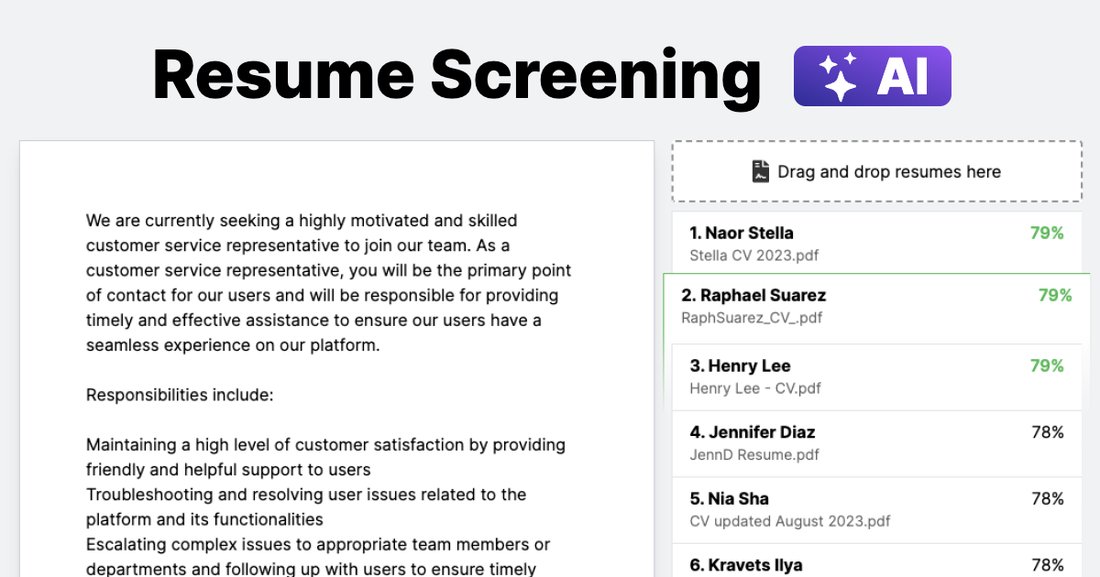
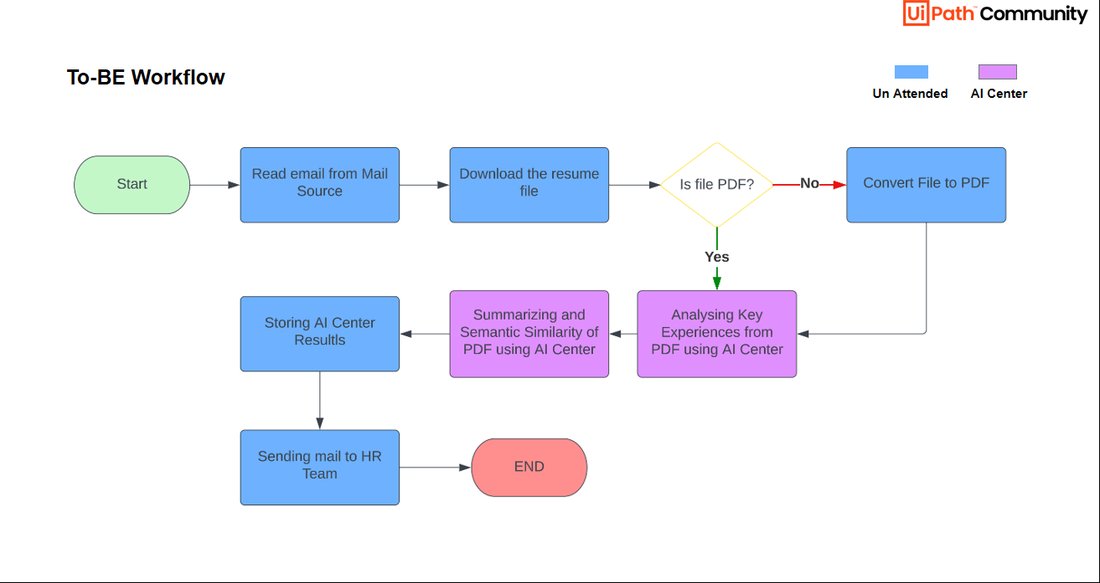
AI screening software doesn’t “read” like humans; it processes text through algorithms. It ranks resumes based on relevance scores derived from keyword density, semantic matching, and structural elements. Headers, fonts, and tables can confuse parsers, leading to rejection. For instance, if the job requires “Python programming,” mentioning “coding in Python” multiple times boosts your score, but irrelevant fluff dilutes it.
Modern ATS also uses natural language processing (NLP) to understand context, but basics like chronological order and standard sections (Summary, Experience, Skills, Education) are expected. Avoid fancy graphics or images—they’re invisible to ATS. According to LinkedIn, resumes with mismatched keywords have a 60% lower pass rate. To beat this, mirror the job description verbatim where possible, while keeping it natural. Tools like Jobscan or Resunate can analyze your resume against postings, scoring compatibility up to 80%.
Master Keyword Optimization for ATS Success

Keywords are the lifeblood of an ATS-friendly resume. Start by dissecting the job ad: identify 10-15 core terms like skills (e.g., “Agile methodology”), tools (e.g., “Salesforce CRM”), and qualifications (e.g., “5+ years in digital marketing”). Integrate them naturally into your summary, skills section, and bullet points under experience.
Aim for a 2-3% keyword density—enough to match without keyword stuffing, which flags as spam. Use variations: if the job says “customer service,” include “client support” and “user experience.” Place high-value keywords in prominent spots: top of the resume, first bullet of each job, and skills list. For SEO in resumes, think long-tail phrases like “led cross-functional teams to exceed sales targets by 30%,” embedding metrics with keywords.
Pro tip: Customize every resume. Generic ones fail ATS 70% of the time, per TheLadders research. Tailor for each application to skyrocket pass rates.
ATS-Friendly Resume Formatting Essentials
Formatting is where most resumes fail AI screening. Stick to simple, machine-readable designs. Use standard fonts like Arial, Calibri, or Times New Roman (10-12 pt). Avoid headers/footers, text boxes, or columns—ATS reads left-to-right, top-to-bottom, and skips complex layouts.
Save as .docx or .pdf (text-based, not scanned). Use bold for job titles and italics sparingly. Standard section headings: “Professional Summary,” “Work Experience,” “Skills,” “Education.” No tables for experience; use bullet points with action verbs (e.g., “Developed,” “Optimized”). Margins: 0.5-1 inch. One page for most, two max for seniors.
Test readability: Print in black-and-white; if it’s clear, ATS will parse it. Tools like ATS Simulator ensure compatibility.
Structuring Your Resume to Outsmart AI
A winning structure prioritizes scannability. Lead with a 3-5 sentence Professional Summary packed with keywords and value: “Results-driven marketing manager with 8+ years in SEO and content strategy, boosting organic traffic by 150%.” Follow with Work Experience in reverse chronological order: Job Title | Company | Dates, then 4-6 quantified bullets.
Skills section: Bullet or comma-separated list of 10-15 matches (e.g., “Excel, SQL, Google Analytics”). Education last, unless recent grad. Certifications (e.g., PMP, Google Ads) get their own section for keyword hits. Use consistent date formats (MM/YYYY) and spell out acronyms first (e.g., Search Engine Optimization (SEO)).
This format ensures ATS extracts data accurately, passing you to recruiters.
Quantify Achievements to Impress AI and Humans
ATS loves numbers. Vague bullets like “Managed team” lose to “Directed 15-person team, reducing churn by 25% and saving $200K annually.” Metrics prove impact: percentages, dollars, numbers. For every role, include 2-3 STAR (Situation-Task-Action-Result) stories infused with keywords.
Even soft skills quantify: “Enhanced team collaboration via Agile sprints, improving delivery speed by 40%.” This dual-purpose content beats AI filters and captivates humans. Harvard Business Review notes quantified resumes get 40% more callbacks.
Avoid These Common ATS Pitfalls
Steer clear of traps: No photos, graphics, or colors—ATS ignores them. Skip functional resumes; chronological is king. Don’t use special characters (e.g., • for bullets; use – or *). Avoid personal info like age or marital status—irrelevant and risky.
Common errors: Typos (ATS flags mismatches), non-standard sections (e.g., “Objective” instead of “Summary”), or PDFs with embedded fonts. Always proofread with Grammarly, then run through free ATS checkers.
Proofread, Test, and Iterate Your Resume
Final steps: Proofread thrice. Use tools like Jobscan (upload resume and job description for match score). Apply to a test posting on Indeed or LinkedIn to see if it parses. Get human feedback via Reddit’s r/resumes.
Update quarterly with new keywords from industry trends (e.g., “AI ethics” for tech roles). Track applications: A/B test versions to refine.
Conclusion: Your Path to AI-Proof Interviews

Writing a resume that beats AI screening software demands precision: keywords, clean formatting, quantified wins, and testing. Implement these tips, and you’ll bypass 75% of filters, reaching recruiters’ desks. In a world of AI gatekeepers, stand out with a strategic, optimized document. Start today—your dream job awaits beyond the algorithm.
(Word count: 1215)